SynapseNAS lean build
Local AI How it's built See it work Vault Connect Run it
★ View on GitHub
✦ THE NAS WITH A BRAIN

Your NAS shouldn't just store your files.
It should think.

SynapseNAS adds a private brain to the NAS you already have. A local AI operates your server in plain English — files, apps, logs and all — while every change it makes is saved, versioned and easy to undo. It even reads your documents into a private knowledge base only you can search. All on your own hardware, and nothing it can't take back happens without your okay.
★ View on GitHub See the AI ↓
Ollama LangGraph FastAPI Docker
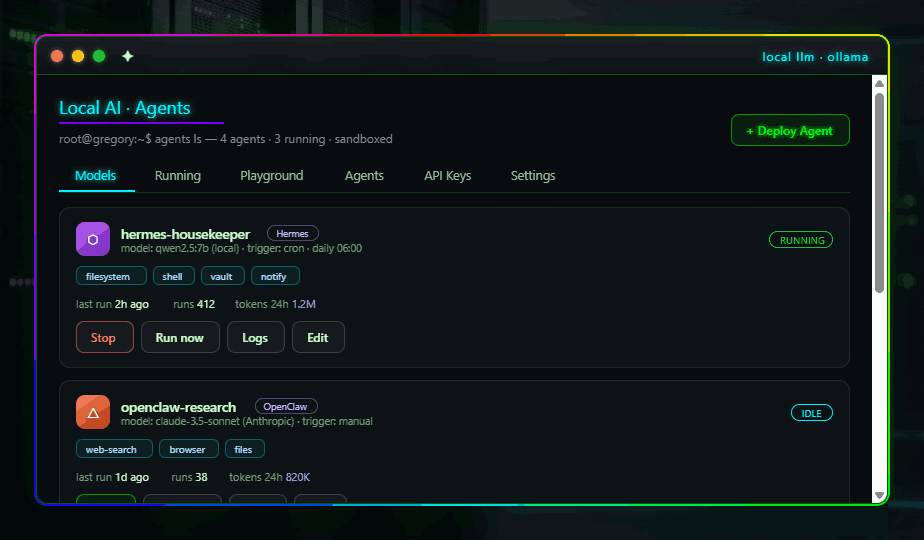
AI agents
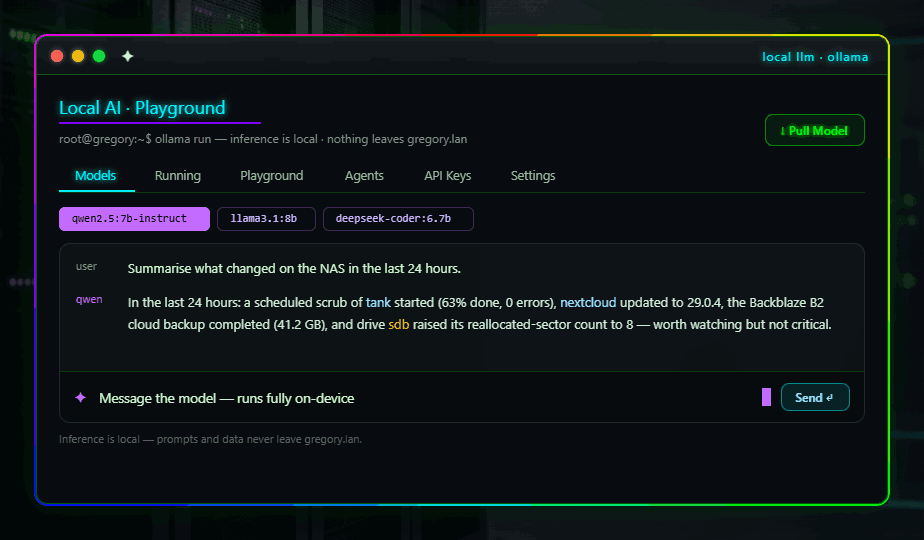
Local AI playground
✦ AI runs on your own hardware | ⛉ You approve anything risky | ⬡ Works next to your NAS | ✓ Nothing phones home | ✓ Free & open source
✦ LOCAL AI · THE CORE

A private AI brain for your whole house.

A full local-LLM stack and a real agent runtime, built into the OS. Your server doesn't just hold your data — it works on it. Privately, on your own GPU, by default.

Local AI playground
✦ LOCAL LLM · OLLAMA

Run any model. Keep everything private.

Download and run any open-source model on your own hardware. Your prompts and data never touch an external server. We've included a playground and OpenAI-compatible API so you can use it like any other service—just locally.

> Run any model you choose
> Built-in chat interface & OpenAI-compatible API
> Zero subscriptions, zero token costs
◆ SYNAPSE VAULT · KNOWLEDGE BASE

It reads your documents, so you can just ask.

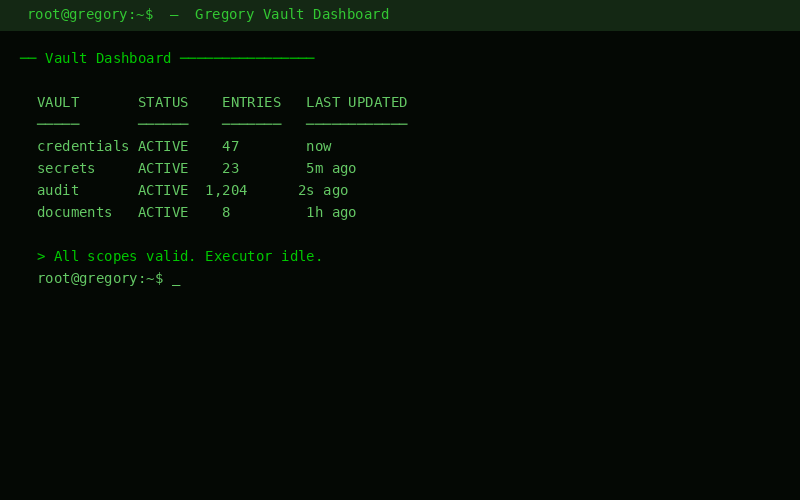
Drop in a file and it's read, sorted and indexed entirely on your NAS — nothing leaves the house. Names, dates and amounts are pulled out by plain, predictable code; the AI only writes the readable summary on top. Your files stay the source of truth, and passwords are pointed to, never copied.
> PDFs, photos and scans — read at home
> Search by name, type or plain words
> Secrets shown once, never stored
> Yours to audit or delete, anytime
Gregory Vault dashboard with summaries and audit
⬡ THE ASSISTANT · ONE AGENT, BUILT IN

One assistant that actually gets things done.

There's a single built-in assistant. Tell it what you want in plain English and it figures out which action to take, does the safe things on its own, and stops to check with you before anything that can't be undone. It runs on your own hardware by default — and you can hand it a cloud model whenever a job needs the extra muscle.

AI agents
Every app lends it tools
Each part of SynapseNAS hands the assistant its own set of tools. They're all pooled together, so one assistant can reach your files, your apps, your logs — everything.
It plans before it acts
It reads your request and picks the right tool before doing anything. That matching is simple and rule-based today; you can drop in a local or cloud model for smarter planning anytime.
Risk decides what waits
Safe, reversible actions just run. Anything that can't be undone pauses for your approval — and it picks up right where it left off once you say yes.
⛉ EVERY ACTION HAS A RISK LEVEL

Safe runs on its own. Risky waits for you.

Everything the assistant can do is a named action with a risk level attached. Reading and checking just happen. Things you can take back run too, but get written down. And anything you can't undo always stops to ask — if an action isn't recognised, it's treated as risky to be safe.

Just runs
Reading & checking
SAFE
Looking at files, listing apps, tailing the logs, reading stats — none of it changes anything, so it happens with no interruption.
read a file list apps read logs
Runs, but noted
You can take it back
REVERSIBLE
Restarting an app or reloading a service goes through on its own — but it's written down so you always know what happened and when.
restart app reload service
Waits for you
Can't be undone
RISKY
Deleting a snapshot, removing a file, rebooting, revoking a key — the assistant stops and shows you exactly what it's about to do, then waits for your yes.
delete snapshot reboot
⚿ CLOUD MODEL · ONLY IF YOU WANT IT

Bring in a cloud model only when you want to.

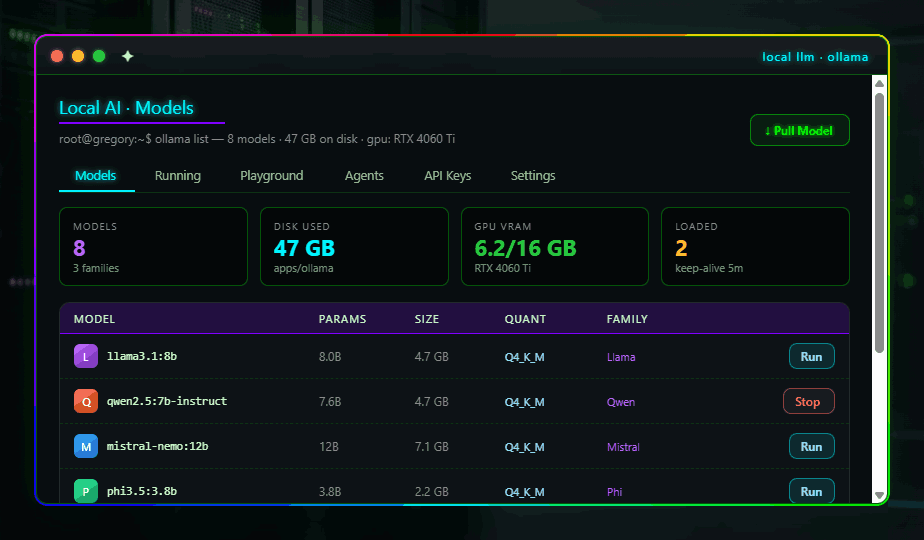
Out of the box it thinks using a model on your own hardware. If you'd rather hand the harder jobs to OpenAI, Anthropic or Google, there's a clean spot to drop in your key — and it's only used while that task runs. Don't want any of it? Skip it and stay entirely on your own machine.
OpenAI Anthropic Google Gemini Groq + any OpenAI-compatible API
AI API keys
⛉ RUN ANY AGENT · SANDBOXED

Run any agent — safely boxed in.

Bring your own agents and run them right here. Deploy any third-party agent — Hermes, OpenClaw, your own LangGraph or CrewAI projects, even plain MCP servers — and SynapseNAS runs it in a locked-down sandbox. A brand-new agent can do nothing at all until you hand it permissions, one piece at a time.

Hermes OpenClaw LangGraph CrewAI MCP servers
Nothing's allowed until you allow it

Every agent starts walled off: capped CPU and memory, no network unless you add an address to its allow-list, read-only except for one data folder, and any passwords it needs handed in only as it runs — never saved into the agent.

And there's only one door back into SynapseNAS — a single checked, logged channel. Ask for something it wasn't granted, and the answer is simply no.
Pick how hard to box it in

The same agent, three strengths of containment — a hardened container, a micro-VM with a real kernel boundary, or a full virtual machine for code you trust the least. You approve the deploy, and you approve anything that ever widens its reach. That's the whole deal.

That strongest option — a full virtual machine — is a headline feature in its own right, not just an agent box.
root@gregory:~$ agents — deploy · sandbox · scope · audit · every action gated
⬢ HOW IT'S BUILT · SAFE BY DESIGN

A few simple rules keep it safe.

SynapseNAS works next to the NAS you already run — as a container or right on a Linux box. It never tries to take over your storage, disks or network. Three rules cover the whole thing: reading only reads, every change takes one checked path, and the assistant can only use the tools it's been handed. Anything that can't be undone waits for you.

Reading only reads
READ
Every screen gets your server's real state through one shared layer — files, apps, AI, logs, resources. Looking at something can never change it.
Changes take one path
WRITE
Nothing runs raw commands. Every change is a clearly-named action with a risk level, run through one safe gate. Anything unrecognised is treated as risky.
The AI only uses tools
AGENT
The assistant can only do what it's been handed as a tool. It plans which one to use, runs the safe ones, and waits on the risky ones.
WHAT IT LOOKS LIKE
you  "free up some space — clear out stopped apps and the oldest backup"
the assistant
cleared the stopped apps (safe — done)
wants to delete the oldest backup (can't be undone)
paused — waiting for your OK
you said yes → backup removed · written to the log
TWO SWITCHES · POINT IT AT YOUR BOX
where it reads from  sample · your Linux box · TrueNAS
# flip this and the screens show real data
who makes changes  sample · your box, for real
# the one gate that every change goes through
Six parts read your real server today; the other nine show realistic sample data until you connect them. Turning one on is a tiny change — no rewrite.
▤ NOTHING HAPPENS IN THE DARK

You can see everything it does.

Every change SynapseNAS makes is written to a running log you can read anytime — what happened, who asked for it, and when. And when something takes a while — a big copy, an import, a model download — you watch it happen live, line by line, instead of staring at a spinner.

A log of every change
~/audit · newest first
14:02 you · restarted Jellyfin
13:51 assistant · cleared 3 stopped apps
13:48 you · deleted a backup · approved
09:30 schedule · re-indexed the vault
It only adds, never edits — so the record always tells the true story. You and the assistant write to the very same log; there's no separate version of events.
Long jobs, streamed live
running
job · downloading llama3.1
> fetching layers… 4.7 / 4.9 GB
> checking the file… ok
> writing it into place…
ready in a moment
Anything that runs for a while happens in the background and streams its output to you as it goes. Close the tab and come back later — it's still going, and the log is still there.
⟳ SAVED SETTINGS · ALWAYS REVERSIBLE

Change a setting today, undo it next week.

Every setting in SynapseNAS is kept as a plain, saved file, and each change is quietly versioned — like a document's history. You preview a change before it happens, look back over everything that's ever changed, and roll any of it back to exactly how it was.

~/config · what you changed
+ network  · turn on VLAN 20
~ users    · give greg a login shell
preview  → the exact before-and-after, first
apply    → writes only what changed, reloads
history  → every snapshot, newest first
rollback → restores any point, exactly
See what changed
A clear before-and-after, so nothing happens by surprise.
Keep the full history
Every change is recorded with what it was and when.
Roll back anytime
Pick an earlier point and SynapseNAS puts things back.
Applying is tidy and safe: settings you didn't touch are left exactly alone, and the reload that makes a change live runs through the same approval-and-log gate as everything else.
⇄ ONE MCP HUB FOR EVERYTHING

If it has an API, it can plug in.

Every SynapseNAS tool speaks MCP — the shared language AI assistants use to call things — and the built-in hub serves them all back out. Connect anything with an API, install your MCP servers on the NAS, and reach the whole lot from one place — from Claude on your phone, ChatGPT, or your own agents. Each connection gets its own key, and that key decides exactly what it's allowed to touch.

YOU BRING IN
Your services & MCP servers
Point it at anything with an API — and drop all your MCP servers onto the NAS in one place.
any REST API MCP servers your apps
SynapseNAS · one secure hub
Pools every tool and every MCP server behind a single door — and hands out access by API key. The same gating that protects your server protects what flows through it.
one key in · only what that key allows out
REACH IT FROM
Any AI client, anywhere
Claude on mobile, ChatGPT, your own agents — local or out on the road. Same hub, same rules.
Claude (mobile) ChatGPT your agents
Access by key
Each key is scoped to the exact tools you pick — your phone read-only, an agent a wider set. A key is shown once when you make it, and you can revoke or rotate any of them in a tap.
Live streaming
Any client that supports MCP's streaming connection can talk to it in real time — including Claude and ChatGPT on your phone.
Boxed in safely
Each integration runs in its own container or VM, so you can use OS-specific tooling without it ever touching the rest of your server.
One door for everyone
Three kinds of caller — your own devices, the built-in assistant, and sandboxed agents — all come through the same scoped, audited door, with the same approval gates. No side entrances.
⊕ AND IT BUILDS THE SCREENS

Add an integration — it builds its own screen.

Connecting a new service usually means someone has to design a page for it. Here, SynapseNAS does that for you: it looks at what the integration can do and drafts a matching screen — buttons for its actions, tables for its data — in the same look as the rest of the system. You see it, tweak it and approve it before it's saved.

1 · DRAFT
It proposes a screen
A model reads the integration's actions and data and lays out a panel for them — running on your own hardware, or a cloud model if you prefer.
2 · REVIEW
You check and adjust
See a live preview, change what you want, then approve it — or send it back to be redrawn. Nothing goes live on its own.
3 · SAVED
It's locked in
Once approved, the screen is saved and just runs — no AI involved from then on. It's versioned too, so you can roll it back like any other setting.
[#]
Always on-brand. The AI can only build from a fixed kit of SynapseNAS parts, so every generated screen looks and behaves like the rest of the system.
[✓]
Safe by construction. Because it assembles from that kit instead of writing raw code, a buggy or sketchy integration can't slip anything harmful onto your screen.
▣ WINDOWS · LINUX · KVM

Run Windows and Linux, right on the NAS.

Some jobs only work on a particular operating system — a Windows-only app, a Linux-only utility. Instead of keeping a spare machine around for them, spin up a real virtual machine on your NAS and use it right there. Windows or Linux, as many as your hardware allows.

It's also the strongest box for agents you don't fully trust — the very same VMs do double duty as a hard, kernel-level boundary, with the same approve-before-it-runs rules as everything else.

[+]
Build it in a click
Start from a ready-made Linux image or a Windows install disc — pick cores, memory and disk, and go.
[>_]
Get a screen to it
Open a console right in the browser, resize it, snapshot it, or roll it back when something goes wrong.
[⛉]
Gated, like everything
Creating, resizing or deleting a VM waits for your approval and is written to the log — no surprises.
[↺]
Saved as config
Each VM's setup is kept as plain, versioned config — so you can rebuild the exact same machine from scratch anytime.
root@gregory:~$ vms — Windows · Linux · create · console · snapshot · gated
▶ RUN IT YOUR WAY

One process. Runs where you do.

SynapseNAS is a single app — the AI, the screens and the API all in one. Start it however suits you, and point it at your server whenever you're ready.

In a container EASIEST
Run it right beside your NAS. Point it at the folders you want to browse, your Docker apps and your Ollama — and you're up.
On a Linux box
One small script builds and starts it — or install it as a service so it comes back up on its own after a reboot.
Just to try it
Start it anywhere — even Windows — on realistic sample data, with no access to a real server. Flip one switch when you want it live.
$ docker compose up --build  → open http://localhost:7777

Six panels read your real server the moment you connect it; the rest run on sample data until you do.

Give your NAS a brain.

SynapseNAS is open source and free. Clone it, run it on your hardware, and let AI agents handle your work—all private, all yours.

$ git clone https://github.com/ghively/synapsenas.git
★ View on GitHub How to run it
SynapseNAS
the NAS with a brain · local-first · yours
root@gregory:~$ synapse status — 15 panels · 6 live · 1 assistant · every action logged